


How to Identify Your Registrar
Overview
A domain registrar manages the reservation of domain names. When you purchase a domain name through a registrar, they allow you to perform the following administrative actions:
-
Manage the contact information on the registration entry.
- Some registrars offer anonymous registration services.
-
Manage the nameservers that your domain uses.
-
Manage DNSSEC, which is a security feature for domains.
This document will explain how to identify your domain’s registrar.
Identify your registrar
To identify your registrar, perform the following steps:
-
In your web browser, navigate to InterNIC’s website.
-
Enter your domain name in the text box.
-
Select Domain.
-
Click Submit. A new page will appear that contains information about your domain at the registrar.
-
The Registrar URL line contains your registrar’s home page.
For example, the following image contains the registration information for the cpanel.net domain:
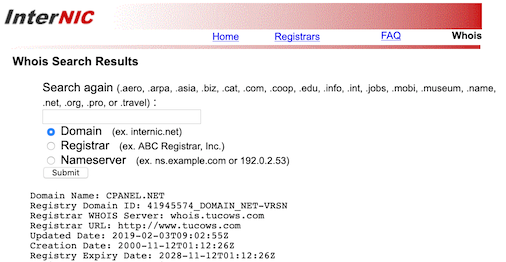
The registrar for cpanel.net is Tucows, and their website is http://www.tucows.com/
Additional information
-
If you do not remember your account or password, use your registrar’s account and password recovery options.
-
If the registrar says that you used one of their registrar resellers, check your billing records to find that company’s website.
-
If the search results return an anonymous or hidden entry, it will still return the name and URL of the registrar.
-
Some hosting providers also provide domain registration services in their hosting packages. Ask your hosting provider for assistance.
感谢您的反馈!